 Glimt
A one-second-a-day video is what it sounds like: one second of film from each day, joined in date order. A year comes to about six minutes. Three iPhone apps will put one together for you: 1 Second Everyday, Leap Second and Glimt, which I made. You can also do it by hand in iMovie.

What you end up with
Film one second a day for a year and you have 365 seconds: six minutes and five seconds. You'll watch that to the end, and the whole year is in it: the snow in January, the new bike, the week everyone was ill. Ten years is about an hour.
The idea is Cesar Kuriyama's. He filmed a second of every day from the day he turned 30, talked about it at TED in 2012 and then built the app 1 Second Everyday.
Four ways to make the film
Four ways, side by side
1 Second Everyday
- Price
- Pro: $49.99 a year or $9.99 a month
- Free version
- Yes: one snippet a day, 1SE branding at the end
- Who picks the second
- You do; Smart Fill can help
- Videos and privacy
- In the app; cloud backup with Pro
iPhone and Android, since 2013.
Leap Second
- Price
- Pro: $29.99 a year or $3.99 a month (US)
- Free version
- Yes
- Who picks the second
- You do
- Videos and privacy
- Privacy label: may track you across apps
On the App Store since 2015.
Glimt
- Price
- $1.99, once
- Free version
- No
- Who picks the second
- Glimt does, and you can change it
- Videos and privacy
- Stay in Photos; nothing is uploaded
iPhone only, new in November 2026.
By hand
- Price
- Nothing
- Free version
- All of it
- Who picks the second
- You do
- Videos and privacy
- Stay in Photos
Camera and iMovie. Takes the most time.
1 Second Everyday is the original and the biggest: on the App Store since 2013, with 48,000 ratings in the US at 4.8 stars, and on Android too. It's free, with one snippet a day. Pro is $49.99 a year or $9.99 a month in the App Store, and it adds music, cloud backup, more than one snippet a day and films without the 1SE branding at the end. I've written up what the free version includes on its own page.
Leap Second has been around since 2015 and is also free to download. Its App Store page lists Pro at $29.99 a year or $3.99 a month in the US, alongside several one-time purchases. Its privacy label says the app may use identifiers and usage data to track you across other companies' apps and websites. 1 Second Everyday's label has no such section.
Glimt is mine, and it's new: it came out in November 2026. Glimt costs $1.99, once. It works the opposite way to those two: you don't pick a clip each day. Glimt goes through the videos and Live Photos already on your iPhone and keeps the best second of each day. You change the ones you don't like. It has no music, no Android version and no cloud backup, and its films are upright only.
By hand costs nothing but time. Film a short clip a day with the Camera app and collect the clips in an album. Once a month, open iMovie (free from Apple), start a movie with that month's clips in date order and trim each one down to about a second. Trimming thirty clips is the step people give up on.
Which one fits
If you're on Android, want the film set to music, or want to make one with friends, 1 Second Everyday is the one. It's also the safest bet for a ten-year project, since it has already lasted thirteen.
If forgetting to film is what stops you, look at how the app fills a missed day. 1 Second Everyday has a feature for that, Smart Fill. Glimt is built around filling missed days: it searches your camera roll day by day, and if you give it a few photos of your child, it prefers the seconds with that child in the picture.
If you don't want another subscription, there's the free version of 1 Second Everyday (one snippet a day, 1SE branding at the end of the film), doing it by hand, or Glimt at $1.99, once.
How to keep it up for a whole year
The hard part is day 40, when nothing happened and you forgot. What helps:
- Set a reminder for the evening, at a time when you're usually home. 1 Second Everyday and Glimt both have one, or set an alarm in the Clock app.
- Hold the phone the same way every day. A film that keeps switching between upright and sideways is tiring to watch.
- Film the boring days too. In five years, the kitchen you had and the way your two-year-old held a spoon are what you'll want to see.
- A missed day isn't the end of the film. You probably took a photo anyway, and a Live Photo holds about three seconds of video, a second and a half on either side of the picture.
- You can start on any day: 14 March to 13 March is still a year.
- Don't delete the videos your seconds come from before you've saved the film. Glimt, for one, reads them straight from Photos and keeps no copy.
How Glimt does it
I made Glimt because I never managed to film every day, yet my camera roll was full of videos of the kids.
So Glimt starts from the camera roll. For each day it looks through the videos and Live Photos, scores the frames with Apple's Vision framework, on the iPhone itself, and keeps the best second. Every day gets a picture in a calendar; tap one to choose another video or move the second within it. When you want the film, pick a month, a year or any range of dates and save it to Photos. You can have the date shown on every second. There's no watermark and no account, and nothing is uploaded.
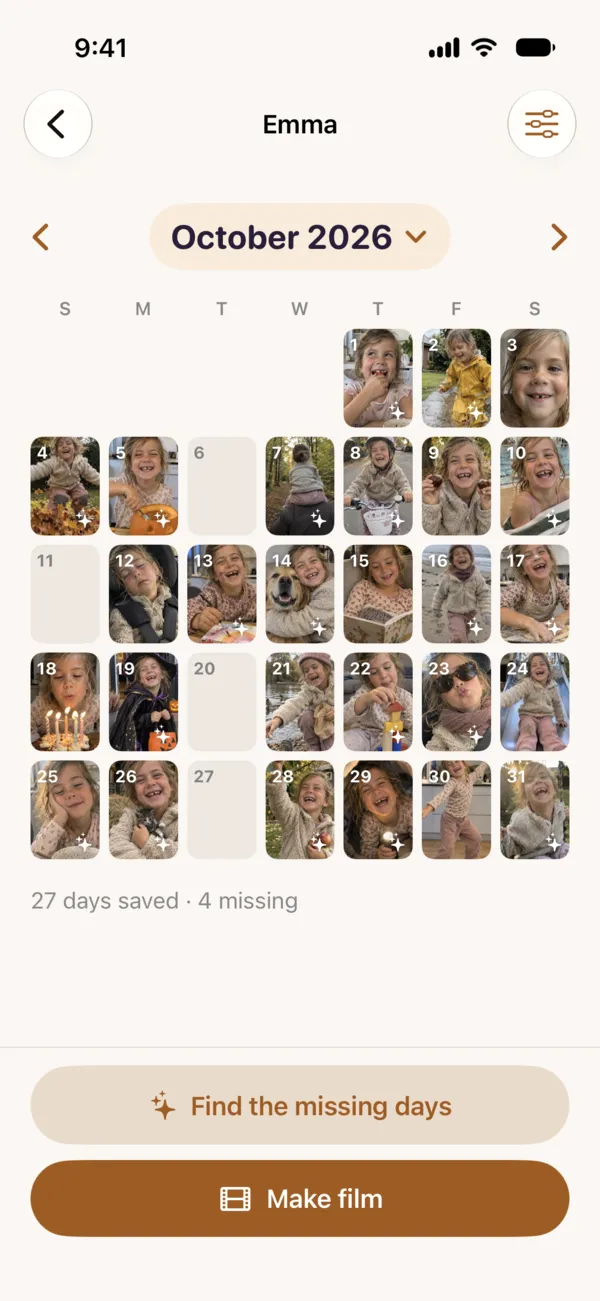 1A picture for every day2Days still missing3Filled from your videos
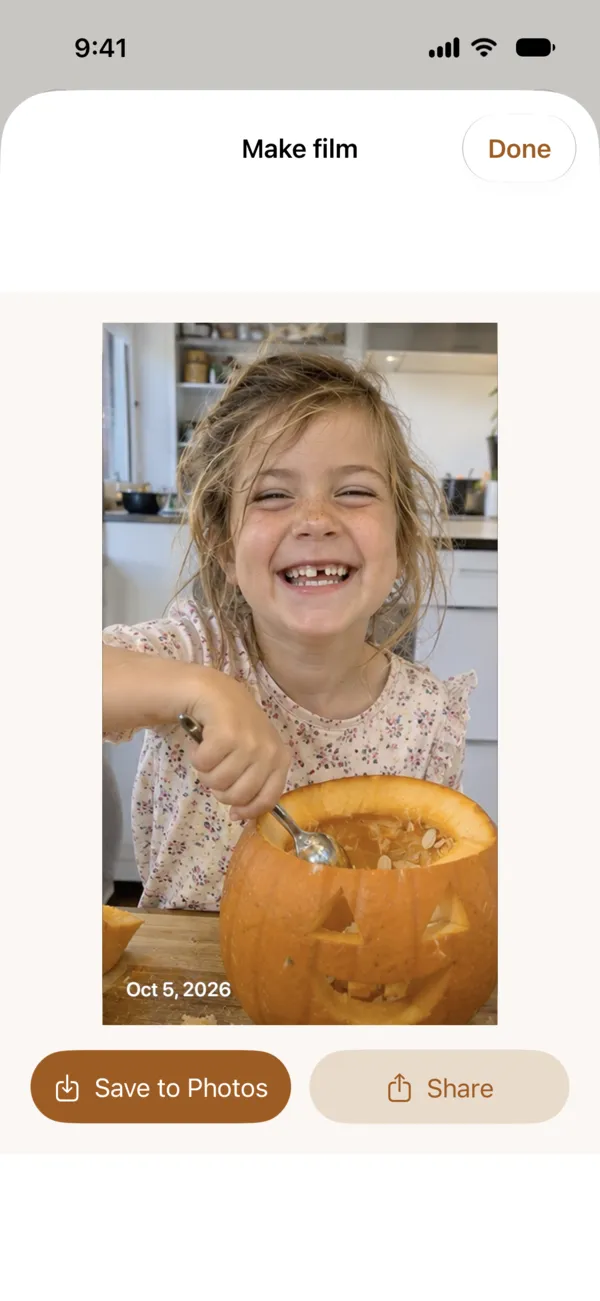 4The date on every second5Share it, no watermark
- A picture for every day
- Days still missing
- Filled from your videos
- The date on every second
- Share it, no watermark
Glimt costs $1.99, once. Get it on the App Store, or read how it recognises your child on the iPhone.